

How to Swap Any Crypto in Your MetaMask Wallet: Complete Guide 2026
In this guide, discover how to swap crypto in MetaMask quickly and securely | Explore the benefits of trading directly from your wallet
Swapping crypto in MetaMask is convenient, but it is not always as simple as choosing two tokens and clicking Swap.
The network you use, the token pair, available liquidity, gas fees, slippage, and MetaMask’s own service fee can all affect the final result. And if the token or network you need is not available inside MetaMask, you may need another route, such as a cross-chain swap provider, a bridge, a DEX aggregator, or a centralized exchange.
MetaMask has also changed a lot. It is no longer just an Ethereum-style wallet for EVM chains. MetaMask Swaps now supports both EVM and non-EVM networks, including Ethereum, Bitcoin, Solana, Tron, BNB Chain, Polygon, Base, and many more. Availability may still depend on your region, wallet version, selected network, token liquidity, and the specific swap route.
In this guide, we’ll explain how MetaMask Swaps works, how to swap tokens step by step, what fees to expect, why some swaps may be unavailable, and when it may make sense to use an alternative like ChangeNOW.
Key takeaways
- MetaMask lets users swap crypto directly inside the wallet.
- MetaMask Swaps supports multiple networks, including Ethereum, Bitcoin, Solana, Tron, BNB Chain, Polygon, Base, Arbitrum, Optimism, Avalanche, and others.
- MetaMask charges a 0.875% service fee, which is included in swap quotes. Network gas fees and slippage may also apply.
- Not every token pair is available in MetaMask. Missing liquidity, unsupported routes, wrong networks, or token restrictions can block a swap.
- Cross-chain swaps are now partly integrated into MetaMask Swaps, but not every asset or network combination will be supported. MetaMask updated its bridge guide on April 23, 2026, noting that bridging is integrated into Swaps for moving tokens across networks in one transaction.
- If MetaMask does not support the token pair or network you need, services like ChangeNOW may offer another way to complete the swap.
Can You Swap Crypto in MetaMask?
Yes. MetaMask has a built-in Swap feature that lets users exchange crypto directly in the browser extension or mobile app.
Instead of manually connecting to different DEXs and comparing rates, MetaMask searches available routes and shows a quote inside the wallet. This makes it convenient for common swaps on supported networks like Ethereum, BNB Chain, Polygon, Arbitrum, Optimism, Base, Avalanche, Solana, Tron, Bitcoin, and others.
However, MetaMask Swaps does not support every asset, pair, or route. A swap may be unavailable if the token has low liquidity, the network is not supported, the route is restricted, or the price impact is too high.
So, MetaMask is a good first option for wallet-based swaps, but not the only one. If the needed pair is unavailable, users can try another route through a bridge, DEX aggregator, centralized exchange, or a swap provider like ChangeNOW.
How to Swap Crypto in MetaMask Wallet: Step-by-Step
Swapping tokens in MetaMask works directly inside the wallet, both in the browser extension and the mobile app. The process is almost the same for regular token swaps and cross-chain swaps: you choose what you want to send, what you want to receive, review the quote, and confirm the transaction.
Before starting, make sure you are using the official MetaMask wallet, have the token you want to swap, and have enough funds to cover network fees. In some cases, MetaMask may offer a gasless swap, but this feature is not available for every network or every transaction.
Step 1: Open MetaMask and Click “Swap”
Open your MetaMask wallet and select the account that holds the token you want to exchange. On the main wallet screen, click or tap Swap. Swaps are available in both MetaMask Extension and Mobile.
Step 2: Choose the Token You Want to Swap
Select the token you want to exchange. If you are making a cross-chain swap, you will also need to choose the network the token is currently on.
For example, you may choose ETH on Ethereum as the token you want to send. MetaMask now supports swapping and bridging through the same Swap flow, so users can select both the token and the source network when moving assets across chains.
Step 3: Choose the Token You Want to Receive
Next, select the token you want to receive. For a same-network swap, this may be another token on the same chain. For a cross-chain swap, you can choose a token on another supported network.
For example, you may swap ETH on Ethereum and receive SOL on Solana, if MetaMask can find a supported route for that trade.
MetaMask Swaps currently supports multiple networks, including Ethereum, Bitcoin, Linea, Base, Solana, Tron, Polygon, BNB Chain, Arbitrum, Optimism, Sei, Avalanche, zkSync Era, Monad, MegaETH, and HyperEVM.
Step 4: Enter the Amount
Enter how much you want to swap. MetaMask will search available routes and show you a quote.
At this stage, check:
- the estimated amount you will receive;
- the network fee;
- the MetaMask fee;
- any price impact warning.
MetaMask’s swap quote may include the quote rate, network fee, and a 0.875% MetaMask service fee.
Step 5: Review the Quote Carefully
Do not skip this step. The quote screen shows whether the swap actually makes sense.
Pay attention to:
- the token and network you are sending from;
- the token and network you are receiving;
- the estimated received amount;
- network fees;
- MetaMask fee;
- slippage;
- price impact;
- estimated completion time, especially for cross-chain swaps.
A swap may return less value than expected because of slippage or price impact, especially when liquidity is low or the trade size is large. Market and network conditions can also change quickly, so a quote does not guarantee the final result until the transaction is completed.
Step 6: Confirm the Swap
If everything looks correct, click Confirm. MetaMask will submit the transaction to the network or route provider.
For cross-chain swaps, the transfer may take longer than a simple same-chain swap. Quoted times are estimates, and delays can happen because of network congestion, bridge routing, or changing market conditions.
Step 7: Check Your Received Tokens
Once the transaction is complete, the new token should appear in your wallet.
If it does not show up automatically, you may need to import the token manually using the correct token contract address. This does not always mean the swap failed. Sometimes the asset is already in the wallet, but MetaMask does not display it by default.
Quick Safety Check Before Confirming a MetaMask Swap
Before you approve any swap, check the basics:
- Are you using the correct network?
- Is the token contract correct?
- Do you understand the gas fee and MetaMask fee?
- Is the price impact acceptable?
- Is the slippage tolerance reasonable?
- For cross-chain swaps, is the destination network correct?
- Are you comfortable with the estimated completion time?
MetaMask Swaps is convenient, but it is still a crypto transaction. Once confirmed on-chain, it usually cannot be reversed.
MetaMask Swap Fees: What You Actually Pay
MetaMask swaps are not free, even when the interface makes the process feel simple. The final cost usually includes several parts: the exchange rate, network fee, MetaMask service fee, and possible slippage.
Here is what users should check before confirming a swap.
1. Network fee
The network fee, also called a gas fee, is paid to process the transaction on the blockchain. It is not charged by MetaMask directly.
This fee depends on the network and current activity. For example, Ethereum gas fees can rise when the network is busy, while swaps on networks like BNB Chain, Polygon, Base, or Arbitrum are often cheaper. Still, fees can change quickly on any chain.
In MetaMask Swaps, this appears as the network fee in the quote. MetaMask explains that this fee can fluctuate depending on network activity.
2. MetaMask service fee
MetaMask also charges its own swap fee. According to MetaMask’s current Help Center, the MetaMask fee for Swaps is 0.875%.
This fee is included in the quote, so users usually do not pay it as a separate line item after the swap. Still, it affects the final amount they receive.
A simple way to explain it:
If you swap $1,000 worth of crypto, the MetaMask service fee is about $8.75, before considering gas fees, slippage, or price movement.
3. Slippage
Slippage is the difference between the expected swap price and the final executed price.
It can happen because crypto prices move while the transaction is being processed, or because there is not enough liquidity for the trade size. Slippage is more common with volatile, low-liquidity, or newly launched tokens.
For example, if MetaMask estimates that you will receive 500 tokens, but the final transaction gives you 492, slippage or price impact may be the reason.
4. Price impact
Price impact is different from normal price movement. It shows how much your own trade may move the market price.
This matters more when swapping large amounts or tokens with thin liquidity. A high price impact warning usually means the trade may be expensive compared with the visible market price.
If the price impact looks too high, it may be better to reduce the swap amount, wait for better liquidity, or compare the route with another provider.
5. Token approval fee
For many ERC-20 and EVM-based tokens, users may need to approve the token before swapping it. This approval is a separate on-chain transaction, so it can require its own network fee.
This does not happen every time. If you have already approved that token for the relevant contract, MetaMask may not ask for another approval. But for a new token, new network, or new route, approval may be required.
6. Cross-chain swap costs
Cross-chain swaps may include extra costs because the transaction involves more than one network or bridge route.
MetaMask now supports swapping and bridging through the same flow. Its Swaps page says users can swap tokens across Ethereum, Bitcoin, Solana, BNB Chain, and other networks in one approval, and that MetaMask finds quotes from DEXs and market makers.
For cross-chain swaps, users should pay special attention to:
- source network fee;
- destination network;
- bridge or routing cost;
- estimated completion time;
- final amount received;
- possible delays caused by network conditions.
7. Gasless swaps
In some cases, MetaMask can include the network fee in the swap quote, so the user does not need to hold the network’s native gas token separately.
MetaMask calls this gasless swaps. Instead of requiring ETH, BNB, or another native token for gas, MetaMask can deduct the network fee from the token being swapped. This feature is currently available for MetaMask Swaps on Ethereum Mainnet, BNB Smart Chain, Linea, Base, Arbitrum, and Polygon, with some requirements.
This does not mean the swap has no fee. It only means the gas fee can be paid differently.
So, how much does a MetaMask swap cost?
There is no fixed total cost. A MetaMask swap may include:
- the exchange rate;
- network fee;
- 0.875% MetaMask service fee;
- slippage;
- price impact;
- token approval fee, if required;
- bridge or routing costs for cross-chain swaps.
The best habit is simple: check the final amount you will receive, not just the token pair. A swap with a nice-looking rate can still be expensive once gas, slippage, and route costs are included.
How to Connect and Use MetaMask with ChangeNOW
You can connect MetaMask to ChangeNOW in two convenient ways: through the built-in MetaMask browser or via the desktop browser extension. Let’s go through both.
Option 1: Using the Built-In MetaMask Browser (Mobile App)
To access ChangeNOW inside your MetaMask wallet, tap the browser icon at the bottom of the app, go to ChangeNOW.io, choose the assets you want to swap, and proceed to the exchange screen.
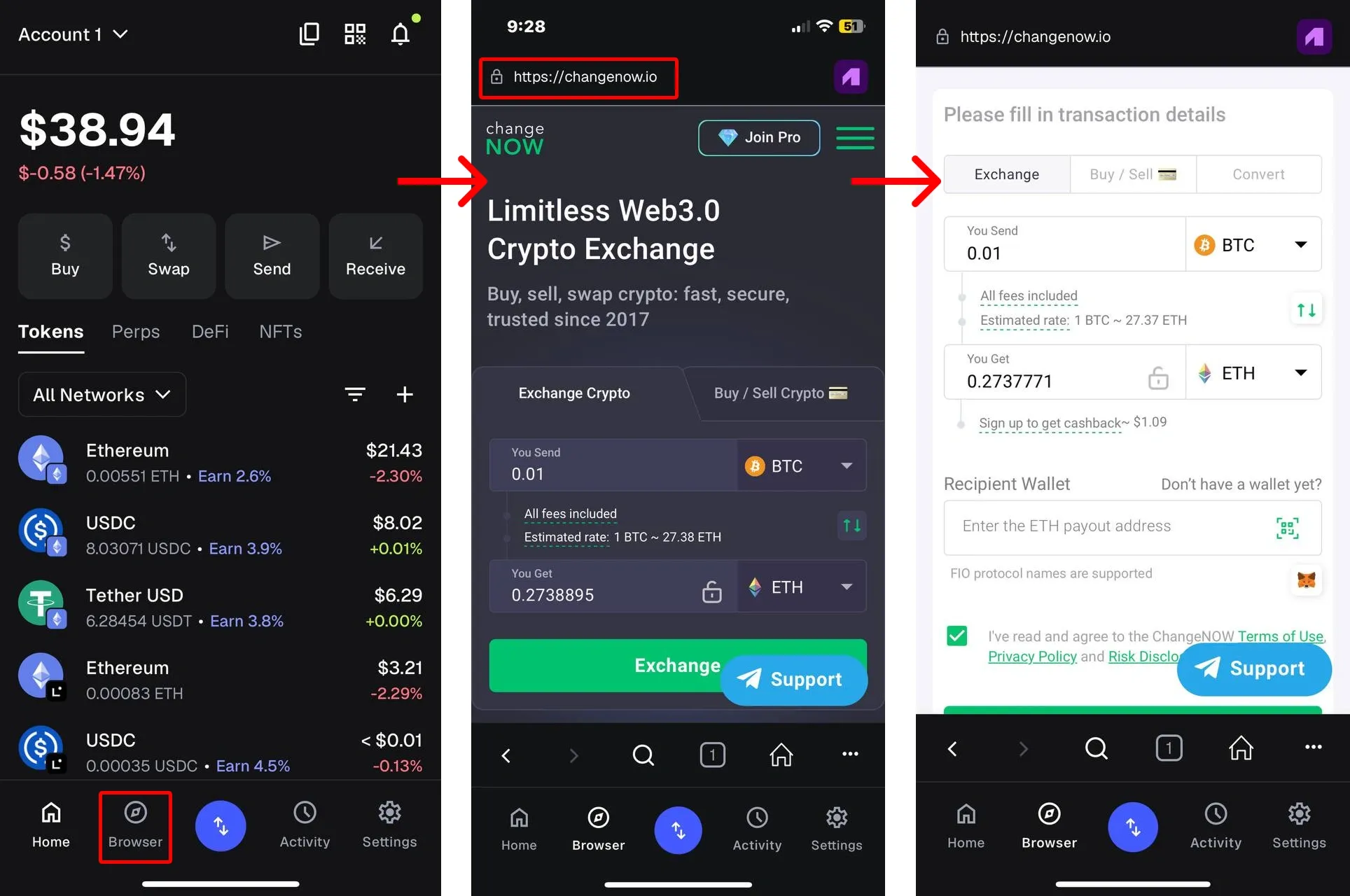
From here, you can complete the swap in two ways:
Use Case 1 — Auto-fill your MetaMask address
On the exchange screen, tap the MetaMask icon — your wallet address will be automatically filled in as the receiver. Then simply send your funds to the deposit address shown and wait for the swap to complete.
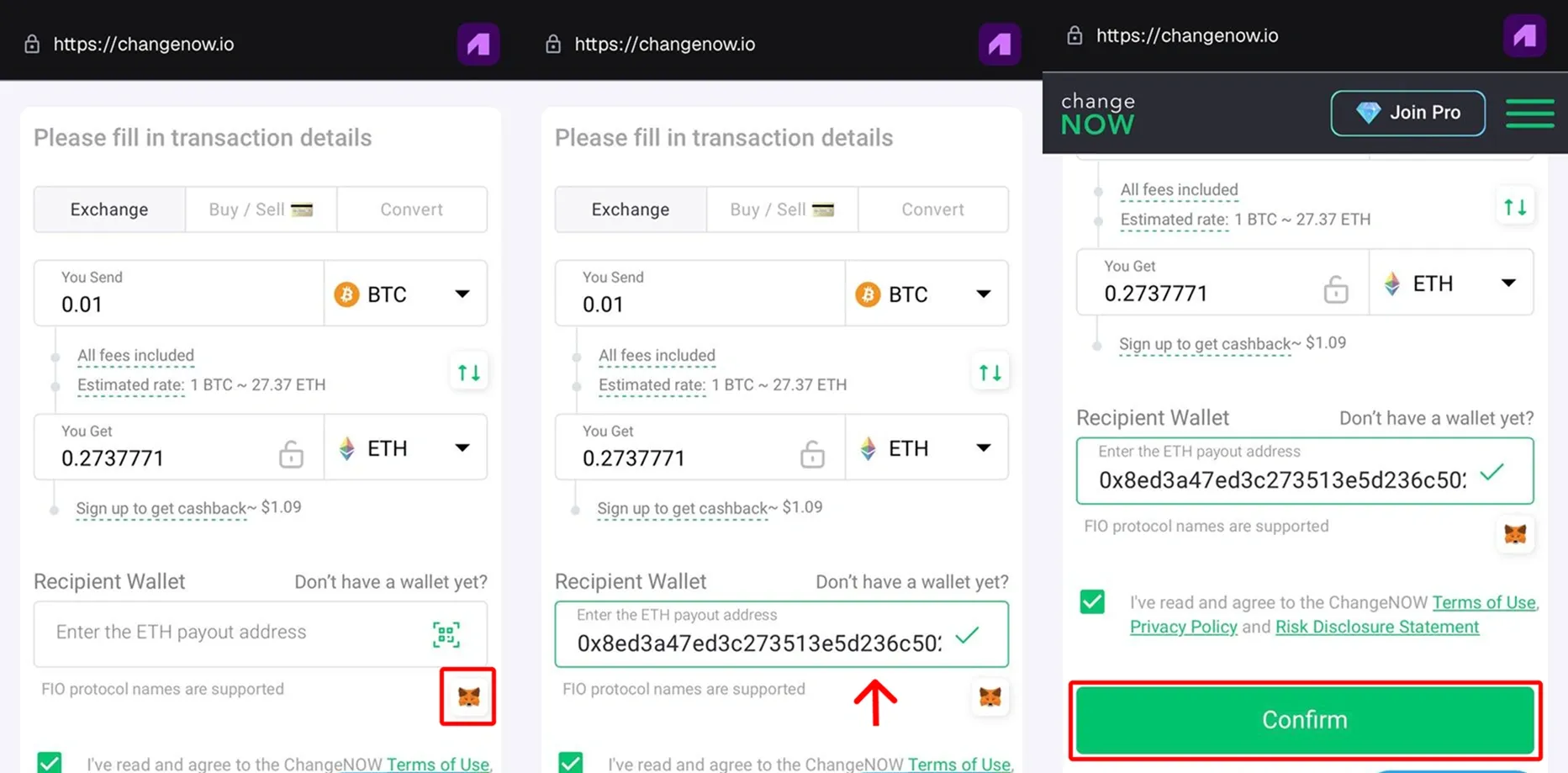
Use Case 2 — Send a deposit directly from MetaMask
This method suits transactions where you want to send the deposit directly from your MetaMask wallet.
Tap Unlock MetaMask on ChangeNOW, confirm the connection, and approve the swap. You can only send the deposit if the selected token and network are supported in MetaMask.
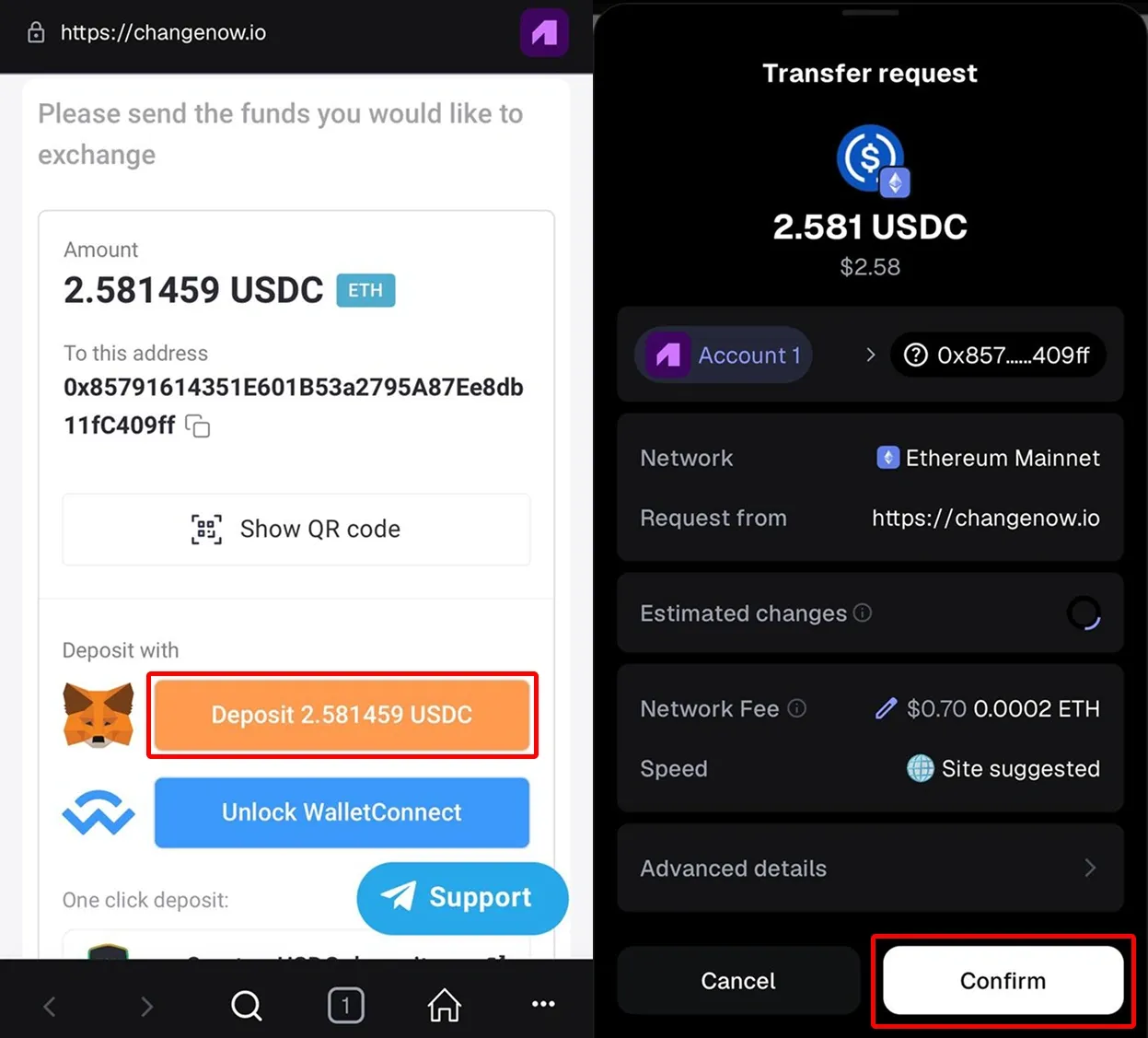
Option 2: Using the MetaMask Browser Extension (Desktop)
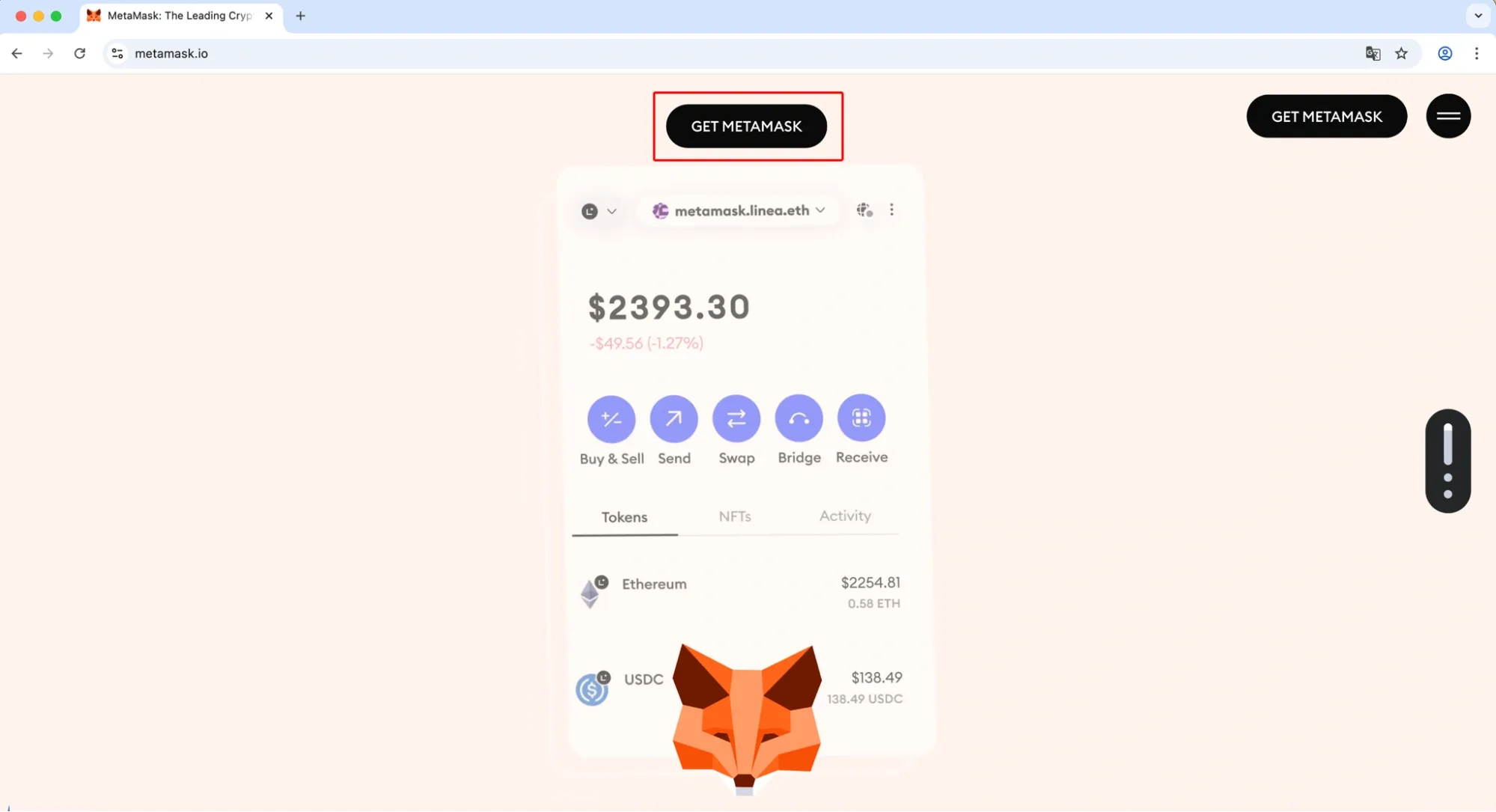
To use ChangeNOW on desktop, first install the MetaMask browser extension from the official website metamask.io and log in to your wallet.
Once your extension is ready, open ChangeNOW.io, select the assets you want to swap, and go to the exchange screen.
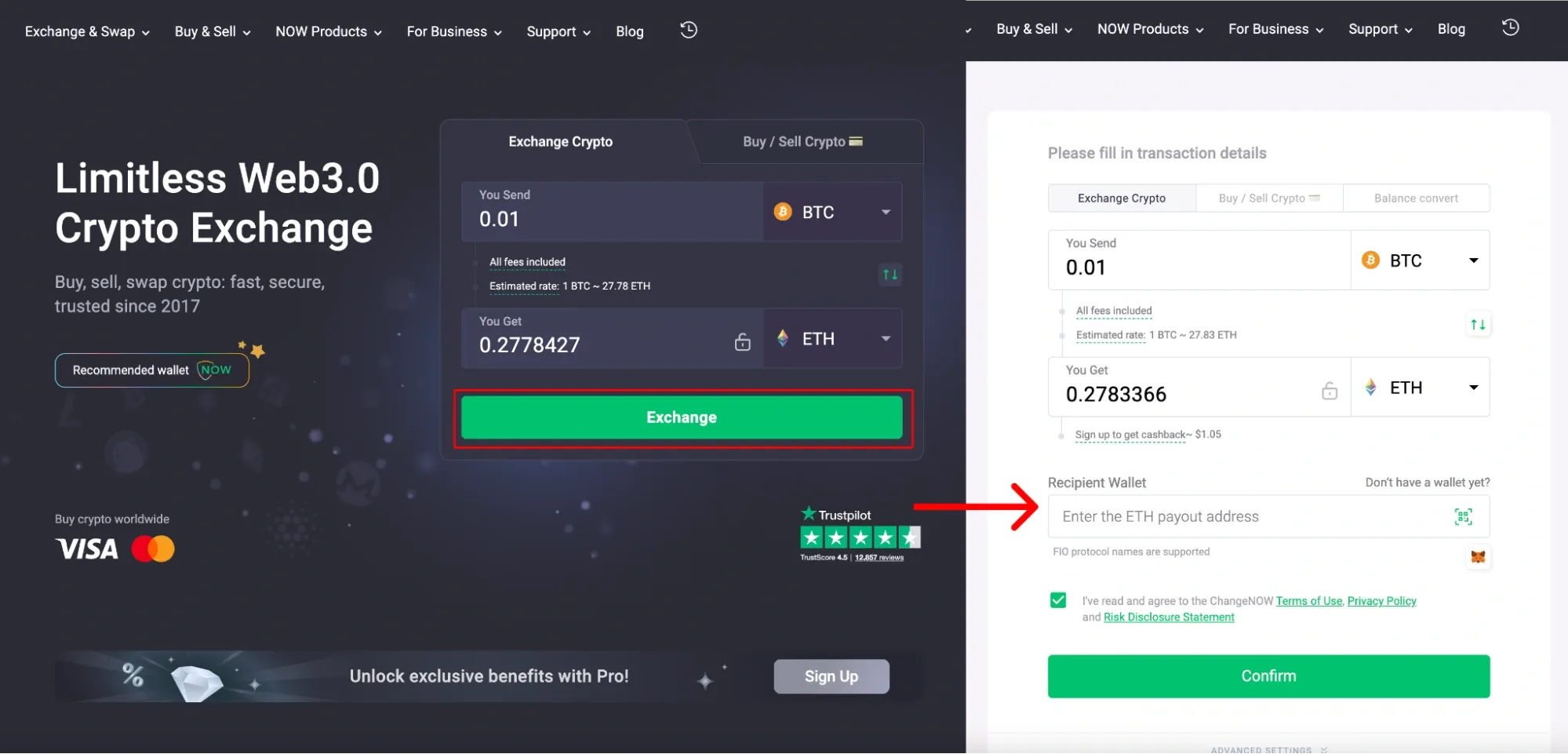
Use Case 1 — Auto-fill your MetaMask address on desktop
To start exchanging crypto quickly, you first need to connect your MetaMask wallet to ChangeNOW. Once connected, the platform can auto-fill your receiving address, so you don’t have to manually copy and paste it.
Steps:
Step 1. Make sure your crypto assets are selected correctly and set up as you need and click on the MetaMask extension icon in your browser
Click the Connect button
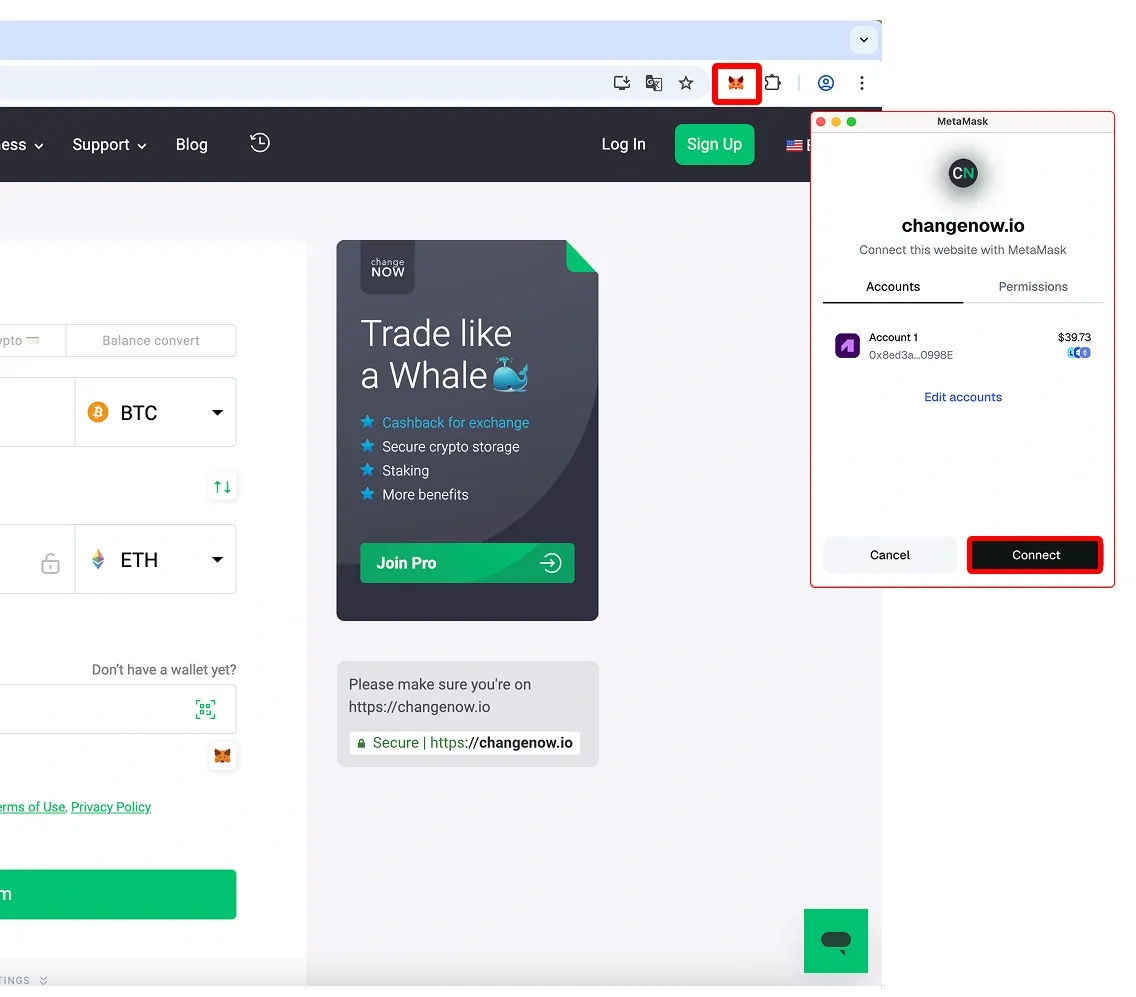
Step 2. Once connected, your wallet address will be automatically filled in for any exchange you perform — just click the MetaMask logo to auto-fill it next time.
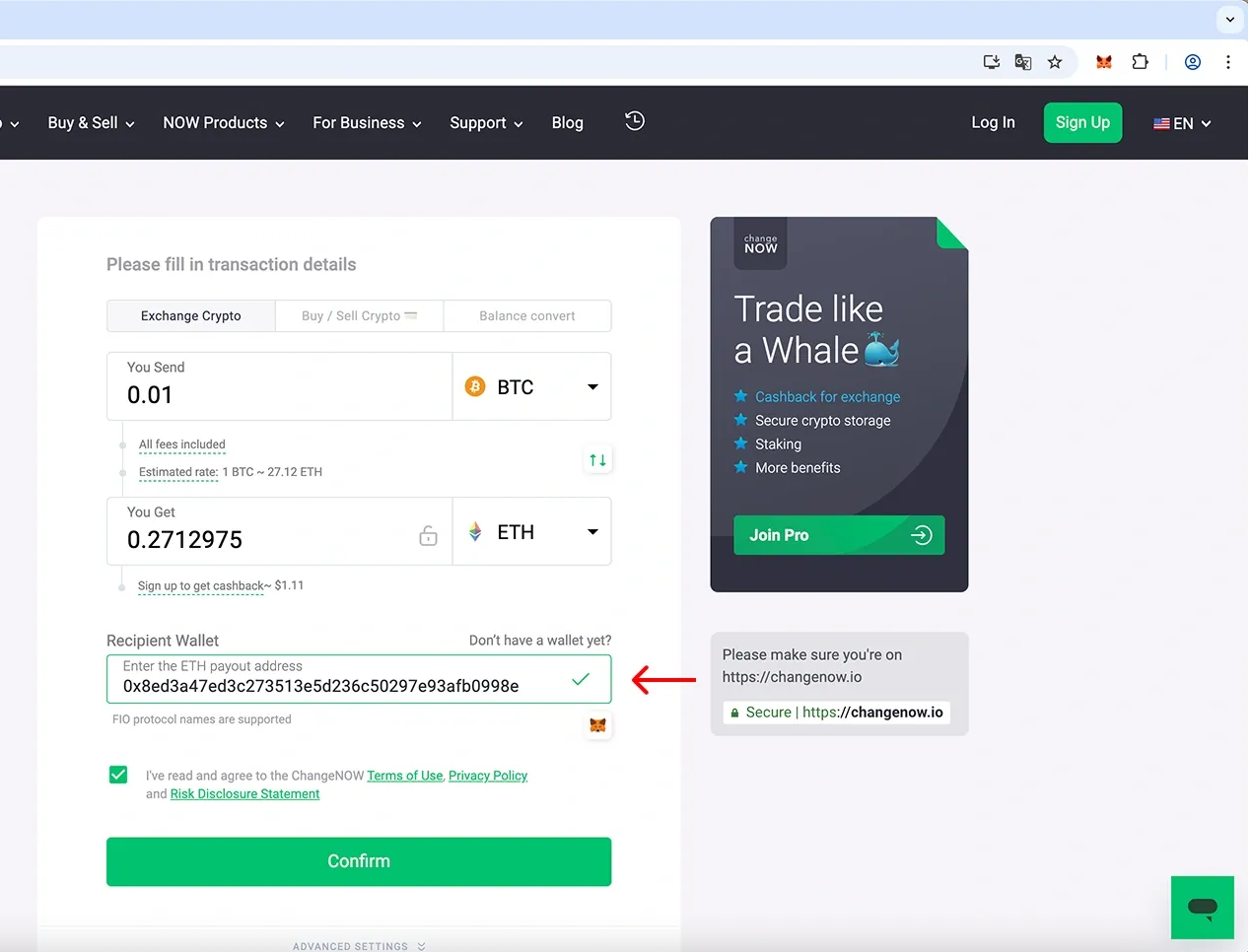
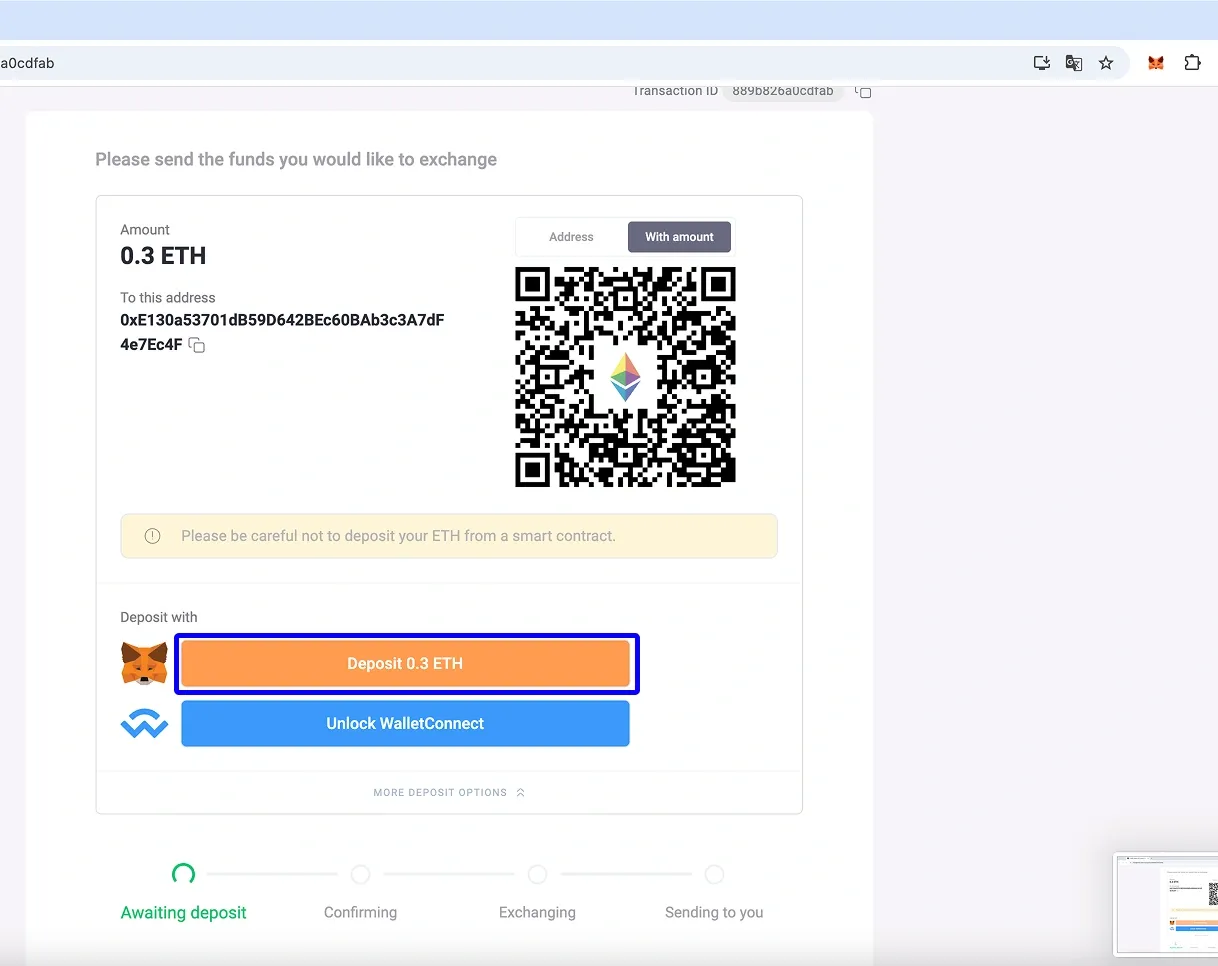
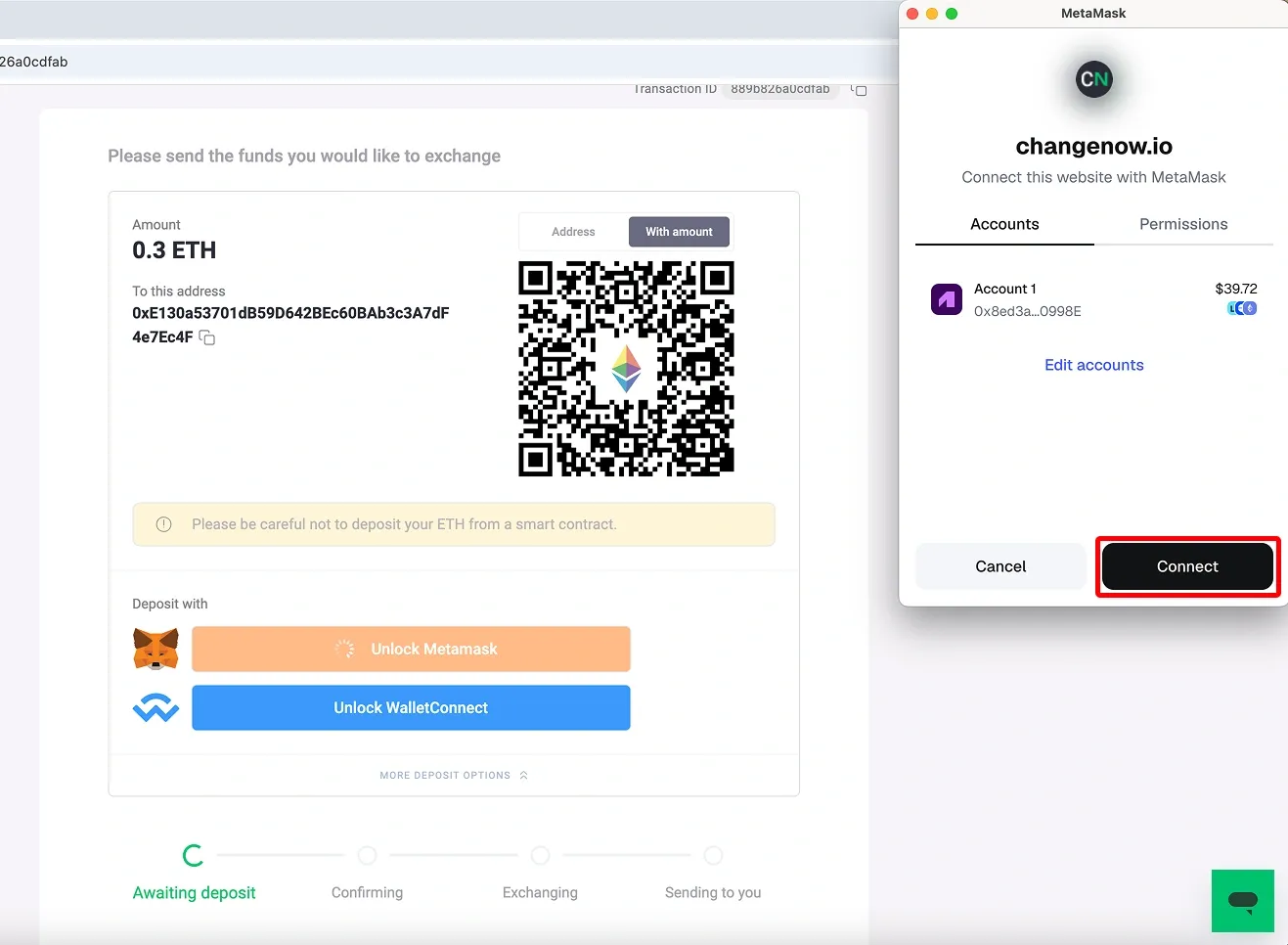
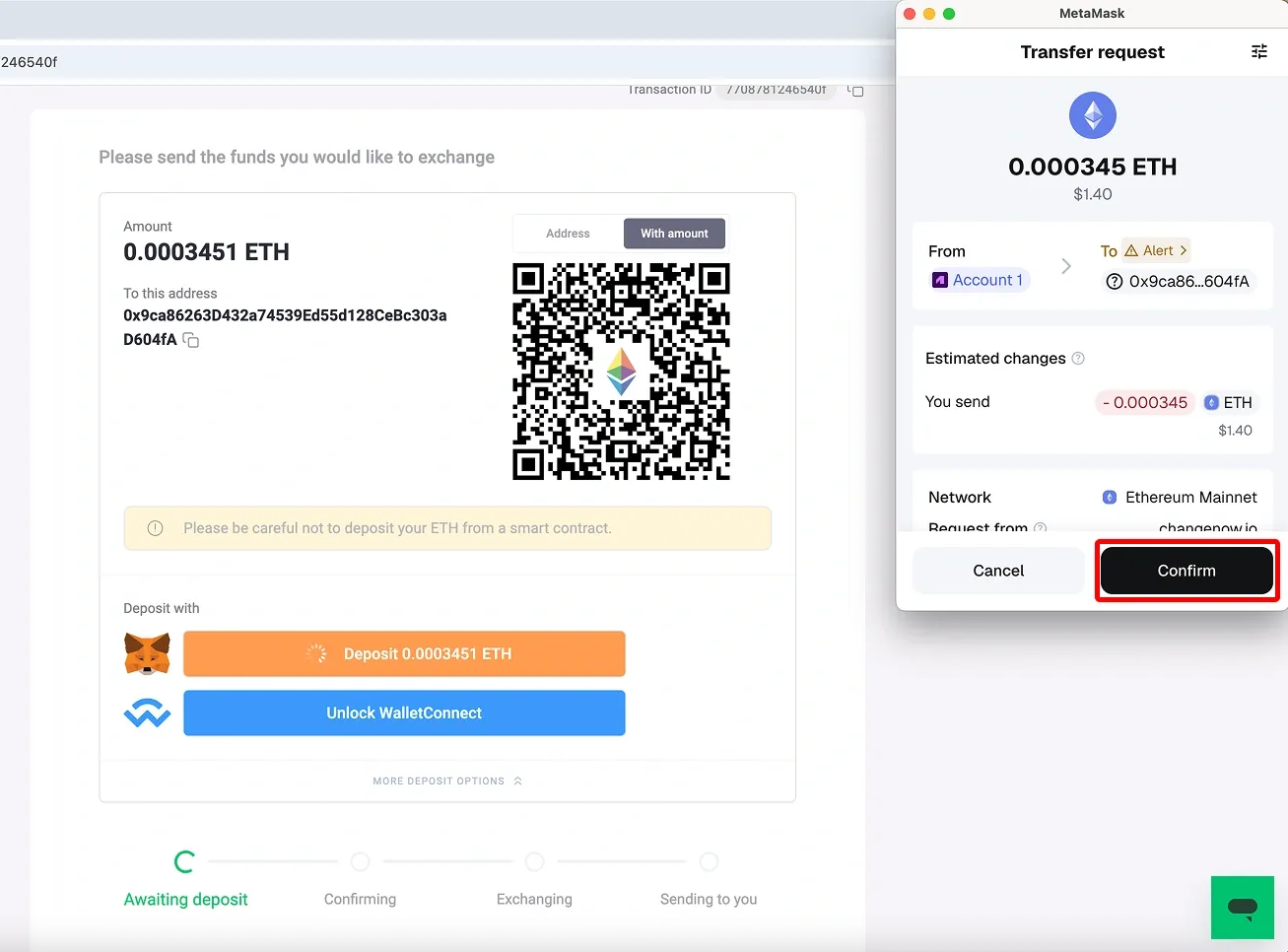
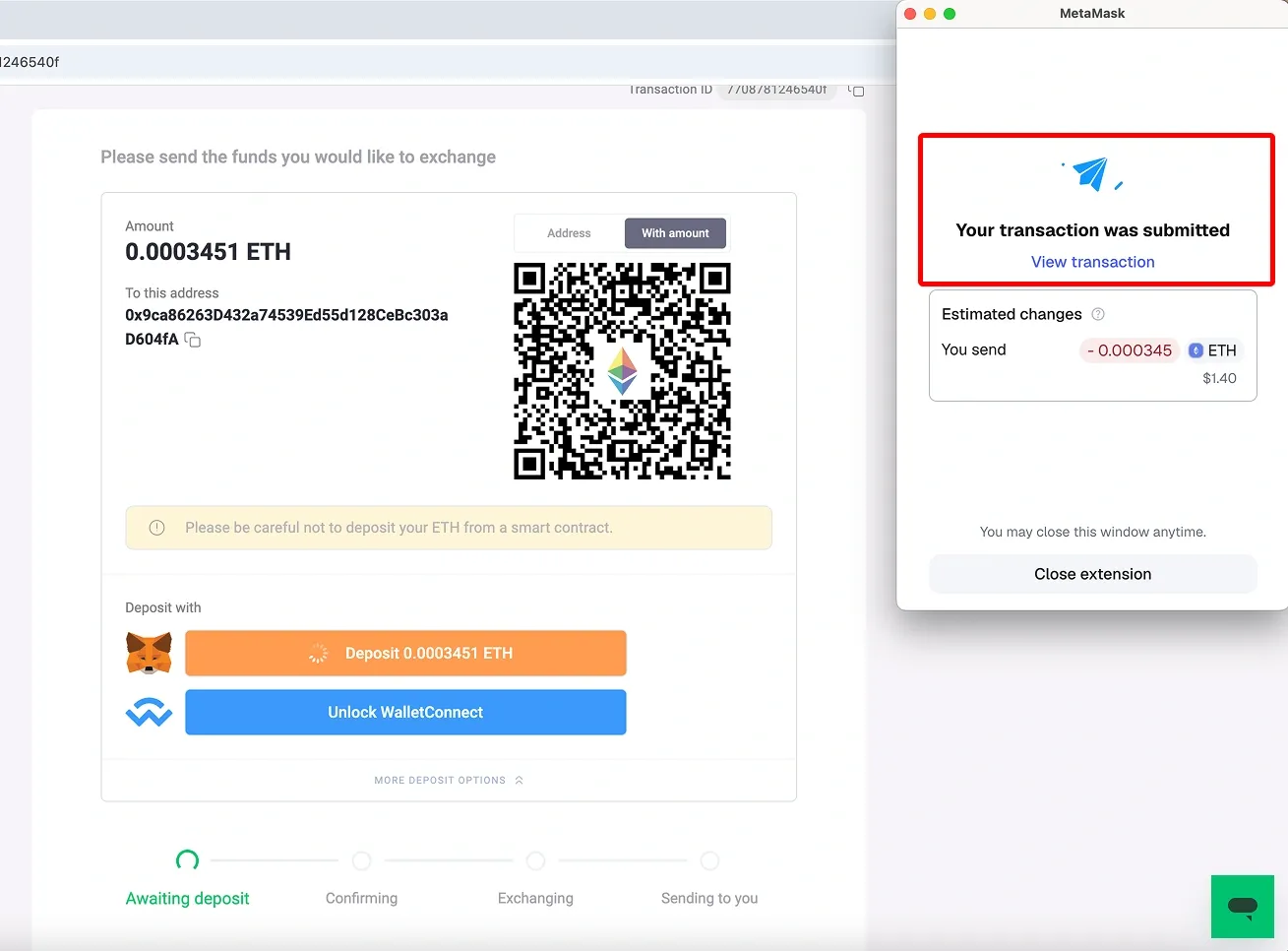
Use Case 2: Depositing Funds from MetaMask You can also make a deposit directly from your MetaMask wallet — a quick and simple way to start your exchange while staying fully in control of your funds.
Steps:
Step 1. Click Unlock MetaMask on the ChangeNOW platform.
Step 2. Connect your MetaMask wallet if it isn’t already connected.
Step 3. Confirm the transaction in MetaMask.
Step 4. Wait for ChangeNOW to process the exchange and receive your swapped crypto.
MetaMask Swaps vs ChangeNOW vs CEX: Which One to Use?
MetaMask Swaps, ChangeNOW, and centralized exchanges can all help users swap crypto, but they fit different situations.
| Option | Best for | Main advantage | Main limitation |
|---|---|---|---|
| MetaMask Swaps | Quick wallet-based swaps | Built into MetaMask and easy to use | Not every token, pair, or route is supported |
| ChangeNOW | Swaps unavailable in MetaMask | Broad crypto-to-crypto swap coverage without standard account setup | Rates, routes, and AML checks may still affect the swap |
| Centralized exchange | Larger trades, fiat, advanced tools | Deeper liquidity and more trading options | Usually requires registration and identity verification |
Use MetaMask Swaps when
MetaMask Swaps is usually the best first option when the token pair is supported and the quote looks reasonable. It is convenient because users can swap directly inside the wallet without opening a separate exchange.
It works best for:
- same-chain swaps on supported networks;
- supported cross-chain swaps;
- smaller or routine wallet-based swaps;
- users who want to keep the process inside MetaMask.
Use ChangeNOW when
ChangeNOW can be useful when MetaMask does not support the token pair or network route the user needs.
It may work better for:
- crypto-to-crypto swaps outside MetaMask’s available routes;
- cross-chain swaps that are unavailable in the wallet;
- users who do not want to create a standard exchange account;
- direct swaps where the user sends one asset and receives another to their wallet.
Still, registration-free does not mean “no checks ever.” Transactions may be reviewed by automated AML systems if flagged.
Use a centralized exchange when
A centralized exchange may be better when the user needs deeper liquidity, fiat deposits or withdrawals, limit orders, or advanced trading tools.
It works best for:
- larger trades;
- fiat on-ramp or off-ramp;
- pairs with poor wallet-based liquidity;
- users who need more control over order execution.
The trade-off is account setup and KYC, which makes it less instant than a wallet-based swap.
Simple rule
Use MetaMask Swaps first if the route is available and the quote is good. Use ChangeNOW if MetaMask does not support the needed pair or network. Use a centralized exchange for large trades, fiat, or advanced trading.
Before confirming any swap, compare the final amount received, fees, route, network, and estimated completion time.
FAQ
Can I swap crypto directly in MetaMask?
Yes. MetaMask has a built-in Swap feature available in both the browser extension and mobile app. It lets users exchange one token for another without manually opening a separate DEX.
Which networks does MetaMask Swaps support?
MetaMask Swaps supports both EVM and non-EVM networks. The current list includes Ethereum, Bitcoin, Linea, Base, Solana, Tron, Polygon, BNB Chain, Arbitrum, OP, Sei, Avalanche, zkSync Era, Monad, MegaETH, and HyperEVM.
Availability can still depend on the selected asset, wallet version, region, liquidity, and available swap route.
Does MetaMask support Solana swaps?
Yes. MetaMask now supports Solana, including SOL and SPL tokens. Users can manage Solana assets alongside Ethereum and other supported networks.
This is a major update compared with older guides that described MetaMask as an EVM-only wallet.
How much does MetaMask charge for swaps?
MetaMask charges a 0.875% service fee for swaps. This fee is usually included in the quote rather than shown as a separate payment after the swap.
Users may also pay network fees, and the final received amount can be affected by slippage, price impact, and token approval costs.
Do I need ETH or another gas token to swap in MetaMask?
Usually, yes. Most blockchain transactions require the network’s native token to pay gas fees.
However, MetaMask also offers gasless swaps on selected networks. In this case, the network fee can be covered using a different token instead of requiring the native gas token separately. This feature is not available for every network or every swap.
Why is a token unavailable in MetaMask Swaps?
A token may be unavailable if MetaMask cannot find a supported swap route. Common reasons include low liquidity, unsupported network, restricted token pair, high price impact, or missing token data.
If the token is not shown, users should also check whether they are on the correct network and whether the token contract address is correct.
Why did my MetaMask swap fail?
A swap can fail because of slippage, sudden price movement, network congestion, lack of liquidity, or an issue with token approval.
If a swap fails, the main swap amount is usually not spent, but the network gas fee may still be charged because the blockchain processed the attempted transaction.
Can I do cross-chain swaps in MetaMask?
Yes, for supported routes. MetaMask now combines swapping and bridging into a more unified Swap flow, so users can choose the source token and network, then the destination token and network.
Still, not every cross-chain route is available. Users should always check the destination network, estimated time, fees, and final amount before confirming.
Can I swap NFTs in MetaMask?
Not through the standard MetaMask Swap feature. MetaMask Swaps is designed for fungible tokens.
NFTs can be stored, viewed, and transferred in MetaMask, but buying, selling, or trading NFTs usually happens through NFT marketplaces or specialized NFT trading platforms.
Is MetaMask Swaps cheaper than ChangeNOW or a centralized exchange?
Not always. MetaMask may be cheaper for some wallet-based swaps, but the final cost depends on the quote, gas fee, MetaMask service fee, slippage, price impact, and route.
The best option is to compare the final amount received, not just the advertised rate.
When should I use ChangeNOW instead of MetaMask?
ChangeNOW may be useful when MetaMask does not support the token pair, network, or cross-chain route the user needs.
It can also be convenient for direct crypto-to-crypto swaps without creating a standard exchange account. However, registration-free does not mean there are never checks: transactions may still be reviewed by automated AML systems if flagged.
Are MetaMask swaps reversible?
No. Once a swap is confirmed on-chain, it usually cannot be reversed.
Before confirming, users should check the token, network, amount, fees, slippage, destination network for cross-chain swaps, and receiving wallet address where relevant.